

Private, fast, and beautiful markdown notes on your new tab page


Autonomous SEO content pipeline from crawl to published post

Private, fast, and beautiful markdown notes on your new tab page
Autonomous SEO content pipeline from crawl to published post
Markdown to Word - Professional Online Document Conversion Tool
Markdown to Word is a professional online document conversion tool that enables fast conversion of Markdown (.md) files to Microsoft Word (.docx) format. It's designed for developers, students, content creators, and business users.
Core Features
✅ High-Quality Conversion: Perfectly preserves Markdown syntax including headers, lists, code blocks, tables, and footnotes, ensuring accurate Word document formatting.
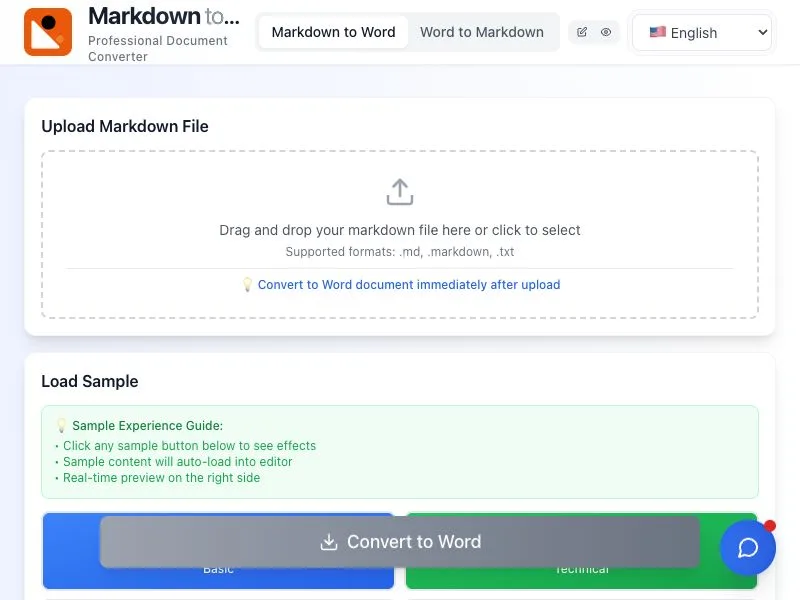
✅ Real-Time Preview: Edit Markdown while viewing synchronized Word preview on the right side - true WYSIWYG experience.
✅ Multi-Language Support: Offers Chinese, English, Japanese and other language interfaces to meet global user needs.
✅ Privacy Protection: Files are transmitted via HTTPS encryption and automatically deleted after conversion to ensure data security.
✅ Free & Unlimited: No registration required, ad-free, with unlimited usage.
Use Cases
📄 Technical Documentation: Developers can convert README.md or API docs to Word format for team collaboration.
🎓 Academic Papers: Students can easily transform Markdown notes into Word documents meeting submission requirements.
✍️ Content Creation: Bloggers and editors can quickly convert Markdown drafts to Word for final polishing.
🏢 Business Operations: Non-technical teams can efficiently write reports in Markdown and convert to Word for sharing.
Simple Steps
Upload or Paste Markdown: Directly paste text or upload .md/.markdown files.
Real-Time Format Adjustment: Modify content in the editor while previewing Word output.
One-Click Conversion: Generate .docx files instantly with "Convert to Word" button.
Download or Share: Save locally or get shareable links.
Key Advantages
⚡ Lightning-Fast Conversion: Handles large files and complex tables with ease.
🎨 Customizable Styles: Choose fonts (e.g., Microsoft YaHei, SimSun), font sizes, and theme colors for professional typesetting.
🌐 Cross-Platform Compatibility: Supports Windows, Mac, iOS, and Android devices.
Try Now 👉 https://markdowntoword.app